Working from home, teaching online, or taking client calls in a shared space can get tricky when people don’t realize you’re in a meeting.
This free printable Zoom meeting in progress sign gives you a simple way to let others know not to interrupt.
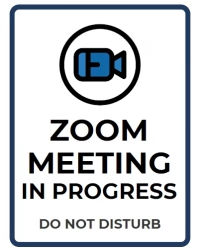
The sign has a clean navy-and-white design with a professional, do-not-disturb style. It is made for doors, desks, office walls, classrooms, conference rooms, coworking spaces, and home work areas.
The printable is intentionally simple. It does not use any logos, app screenshots, branded interface elements, or official brand styling. It is just a clean meeting notice you can print and post when you need a quiet space.
Printable Details
Title: Printable Zoom Meeting in Progress Sign
Used For: Office doors, home offices, conference rooms, classrooms, coworking spaces, private work areas, shared workspaces, and meeting rooms.
Page Length: 1.
Paper Size: 8.5 × 11 in (portrait).
File Size: 69 KB.
File Type: PDF.
Color: RGB.
License: Personal Use.
Image Gallery
At a Glance
Overview
This printable sign is made for those moments when you need fewer interruptions during an online call.
Whether you are in a Zoom meeting, video conference, virtual class, webinar, interview, or client session, a visible sign can help people understand that you are currently unavailable.
The design feels more like a do-not-disturb notice than a general office sign. It is calm, direct, and easy to read. The navy-and-white color palette keeps it professional without copying any platform branding.
The sign says “Zoom Meeting in Progress” with “Do Not Disturb” below it.
There is no extra text on the sign page, which keeps the message clear. You can place it on your door before a call, keep it near your desk, or use it in a shared workspace where other people may walk in without realizing you are busy.
What’s Included in the Printable
This printable PDF includes one Zoom meeting in progress sign and a personal-use disclaimer page.
The sign page uses a simple layout with large text and a generic meeting-style icon. It is designed to be useful in professional spaces while still looking clean enough for a home office.
You can use it in:
- Home offices.
- Business offices.
- Conference rooms.
- Classrooms.
- Tutoring rooms.
- Therapy or coaching offices.
- Coworking spaces.
- Reception areas.
- Shared family workspaces.
- Private meeting rooms.
The printable is especially helpful if you take meetings in a place where other people may knock, walk in, talk nearby, or need a visual reminder that you are currently on a call.
How to Use This Meeting Sign
Download the PDF and print the sign on standard 8.5 × 11-inch paper. Once printed, place it where people will see it before entering or interrupting.
For a home office, you can tape it to the outside of your door before a call. For an office or business setting, you can place it in a clear sleeve, laminate it, or frame it for repeated use.
You can also keep a copy near your workspace and only post it when you are actively in a meeting. That makes it useful for hybrid workers, teachers, coaches, consultants, students, remote employees, and business owners who move in and out of calls throughout the day.
Printing Tips
For quick use, regular printer paper works well. Since the design is simple and mostly white, it should not use much ink.
For a sturdier sign, print it on white cardstock. Cardstock works better if you plan to tape it to a door, prop it on a desk, or use it often.
If the sign will be used every day, laminating is a smart option. You can also place it inside a plastic sheet protector and tape the sleeve to the door. That way, the paper stays clean, and you can reuse it whenever you need it.
Print at full size for the clearest result. If you need a smaller version, adjust your printer settings to scale it down before printing.